

 FlippingBook Publisher
 FlippingBook Automation
 Salespal
How do search engines work with my flipbooks?
 Product: FlippingBook Online
Your FlippingBook Online flipbooks are not indexed by search engines by default. But you can make them searchable on Google and other search engines with a few clicks. We have optimized your flipbooks for SEO so they are fully indexed by Google, Bing, Kagi and other search engines. Your audience will be able to find your flipbooks by simply entering the keywords and phrases contained in your publications in their favorite search engine.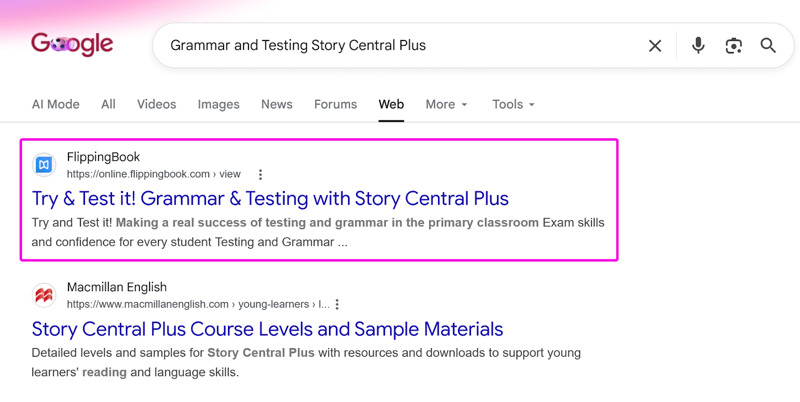
This flipbook made first place when searching for the product, ending up even higher than the company’s own website with other lineup!
This article has answers to the most common questions our users ask about our SEO (Search Engine Optimization):
- How can I enable search engine indexation for a flipbook?
- Should I enable SEO indexing?
- Can I disable SEO-indexing later?
- How will my flipbook show up on Google?
- How can I get a higher position in Google’s results?
- How long does it take for Google to find will my flipbook?
- How does the indexing work when I embed my flipbook into my own site?
- Can I add custom meta-tags to my flipbooks?
How can I enable search engine indexation?
Note
It is not possible to enable search engine indexation during the trial of FlippingBook Online.
To make your flipbook indexed by search engines, follow the steps below:
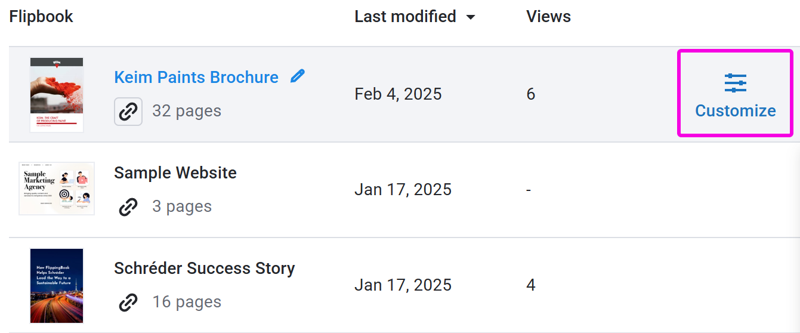
- Open the list of your flipbooks.
- Hover over the flipbook you'd like to change and click Customize
- Go to the Privacy section and click on it to expand it.
- Select the option Public.
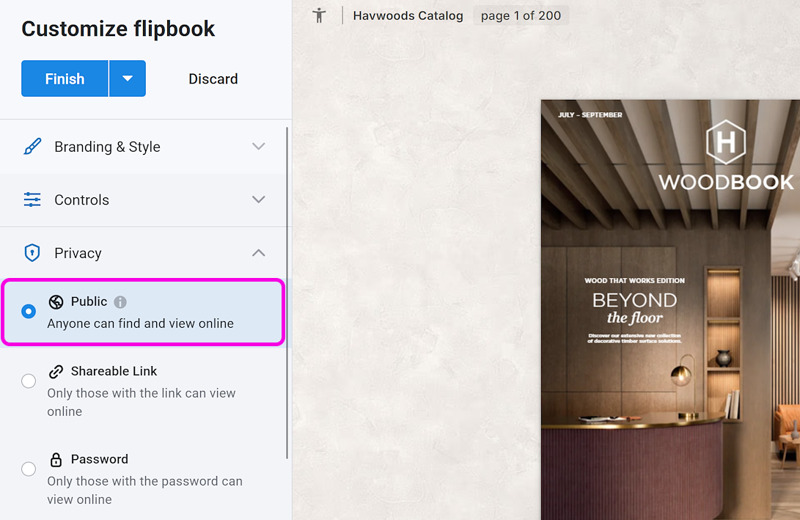
- Click Finish before leaving the Customize menu.
Should I enable SEO-indexing?
If your flipbook is intended only for a specific audience or should only be accessible via a direct link, leave SEO indexing disabled.
Otherwise, we recommend enabling it so that new readers could discover your content through search engines. It also helps existing readers find your flipbooks again, since many people search on Google instead of returning to your website or looking for an old email link.
Can I disable SEO-indexing later?
Yes, it is possible to disable SEO indexing. It is done the same way you enable it, just make sure to select a privacy mode other than Public this time.
Note that this does not immediately remove your flipbook from Google’s results! Even Google doesn’t look at every page on the web every day. This means that it may take a few days or even weeks before your flipbook will stop showing up in Google’s results.
NoteIf time is of the essence and the content of your flipbook needs to be hidden immediately, consider changing the privacy mode of your flipbook to Password or Restricted Access. If this is not an option, contact our support team for possible alternatives.
How will my flipbook show up on Google?
When people find your flipbook on Google they will see something like this:
The search results consist of 3 elements:
- The link. By default, your link looks like this: https://online.flippingbook.com/view/123456789. If you have FlippingBook Online Advanced or higher, then you can set up a custom domain to change the online.flipppingbook.com part to your own site.
- The title of your flipbook.
- A snippet of the relevant text in your publication. Other search engines sometimes show the description in the results.
The title will always appear in the search results. So make sure that it looks nice and reflects the content of your flipbook. This will reinforce your readers that they are on the right way to the info they are looking for.
Learn how to Customize the title and description of your flipbook.
How can I get a higher position in Google’s results?
FlippingBook Online can help you handle the basic technical aspects of SEO, but there are still a few things you can do to improve your position:
- Create high-quality, relevant content that provides real value to readers. Don't just spam relevant keywords on your page!
- Use a clear, descriptive title instead of a file name like document_final_v3.pdf.
- Encourage other websites to link to your flipbook, including your own website.
- Set up a custom domain to increase trust and improve click-through rates. Note that in that case the flipbooks will not be included in our sitemap, so make sure to include the links to all your flipbooks in your website's sitemap instead.
- Keep your content up to date by reviewing it at least every 6 months.
Remember: Google favors useful, up-to-date, and fresh content.
NoteMake sure that your flipbooks use real text. We sometimes see that our clients upload PDFs that consist of just images, and even the text is part of the image. If there is no real text (i.e. text that you can select and copy/paste), then there is nothing to index! And it is also useful for your flipbook’s accessibility.
How long does it take for Google to find my flipbook?
It’s hard to predict when new content is indexed exactly. Even Google doesn't re-index every page every day. Our own experience shows that our flipbooks are fully indexed after about a week. This is no guarantee, and conventional internet wisdom says that it can take between 1 to 4 weeks.
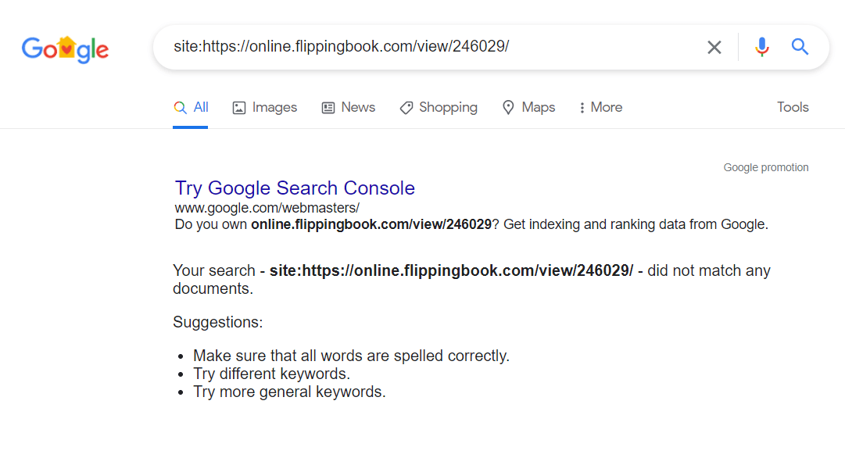
To see if your flipbook has already been indexed by Google, you can open Google and then search for site: followed by the link to your flipbook. If it has already been indexed, you will see some results here. If not, then you will get no hits, like in the screenshot below.
How does the indexing work when I embed my flipbook into my own site?
Search engines index both your webpage where you embed your flipbook into and the flipbook itself. But they are still separate pages. So if someone searches for keywords that appear both on your webpage and in the publication that you embedded into that page, then both are found: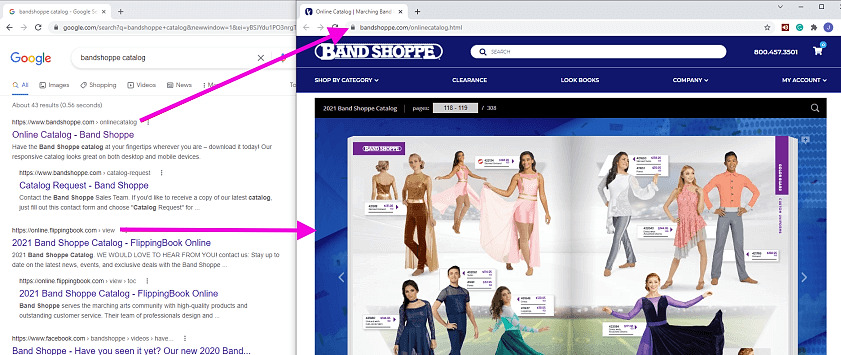
In the example above, you see a lovely embedded catalog. When searching for Bandshoppe catalog, we find both the page on their site, and the direct link to the flipbook. Upon clicking on the top link in the results, Bandshoppe's site is opened, with the embedded flipbook. If we would click on the second link, the flipbook would be opened directly.
If you search for keywords that are present in your flipbook, but they are not on the page the book is embedded on, then only the flipbook would appear in the search results.
Can I add custom meta-tags to my flipbooks?
No, you can’t add custom meta tags. We generate all the important meta tags automatically, based on the flipbook title and description. So make sure these contain relevant information!
Sometimes we get the question if it is possible to add keyword tags to the pages. Since most search engines, including Google, disregard such keyword tags, it is pretty much pointless. That’s why we have no possibility to add such tags.


