

 FlippingBook Publisher
 FlippingBook Automation
 Salespal
Can I use FlippingBook Online with several users?
 Product: FlippingBook Online
Our team plan lineup (Team and Enterprise plans) in FlippingBook Online is an ideal solution for companies that want to have multiple users assigned to the same account. You get:
- Multiple users under the same FlippingBook Online account.
- Different login/password credentials for each user;
- Separate workspaces for each user, with their own flipbooks and their own Trackable links sections;
- Shared folders where all users can collaborate on flipbooks;
- One billing contact and a single invoice for all users within the company.
Contact our Support team to learn about upgrading to these plans or our Sales team if you plan to start with the team option in FlippingBook Online.
How is the common space organized in Team plans?
The main tool that will help you coordinate your team's efforts on your content is shared folders. Check our guide Working together on flipbooks with teams (with the video inside!) for the detailed overview of the Shared Folders functionality.
How are the flipbooks distributed among the users?
Every FlippingBook Online account comes with a set amount of publications that can be active at the same time. For Team and Enterprise plans, this is at least 1000 publications. So most likely, you don't have to worry about this anytime soon. Still, every team member can see how many flipbooks your team has online at all times. This is shown in the bottom-left corner of your account page.
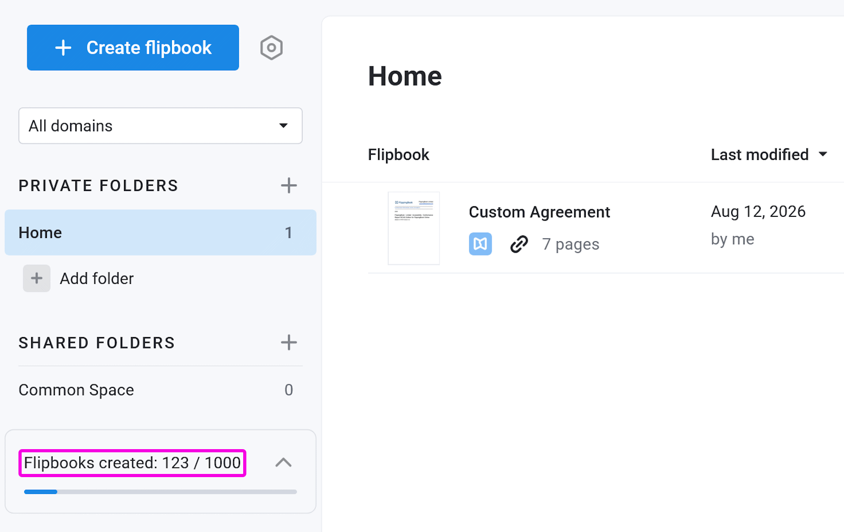
This number may be higher than what you see in your own workspace. That's because it also counts flipbooks in your teammates' private folders, even though you can't see those flipbooks yourself. For example: your account shows 123/1000 flipbooks used, but you can only see 1 of those. The other 122 belong to your teammates' private folders. You don't see them, but they still count toward the limit.
If you get near the limit, then the account owner can see how many flipbooks all members have in their accounts. That's possible on the Team page, which is accessible to the account owner only.
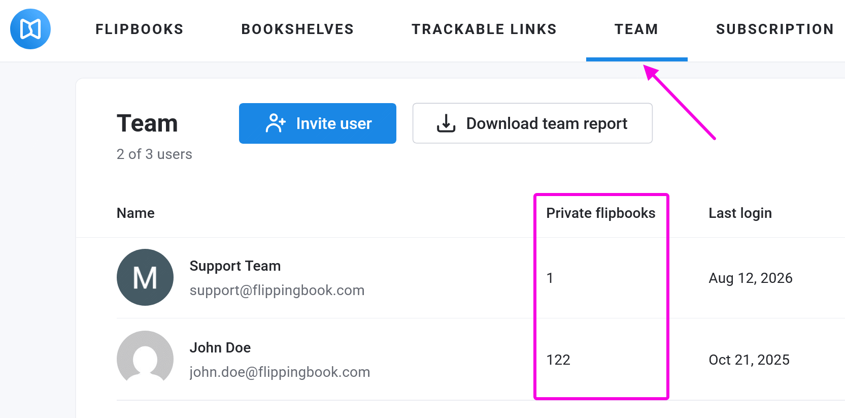
With this information, the owner can ask team members to review their outdated private flipbooks and clean them up as required. Of course, if you need more flipbooks then you can also contact us about the possibilities to increase the limit.
Additional Users
If you want to add more users to your Team or Enterprise account beyond the default number, you can buy additional user slots(*) at any time(**) for both monthly and yearly billing options.
| Per user, with monthly billing | Per user, with annual billing |
| $35/month |
$315 yearly (save 25%) |
| €32/month |
€288 yearly (save 25%) |
| £28/month |
£252 yearly (save 25%) |
(*) This is calculated on a pro rata basis for the time period you’ve already paid for. And, upon the next renewal, a surcharge will be added for every additional user.
(**) To buy additional users, please contact us. Leave your license email address and the number of extra users that you need. We will be happy to provide you with a quote.
Next Steps
- Managing users in team plans
- Managing multiple custom domains in team plans
- Made your decision? Take a look at our FAQ Before Purchase: Questions & Answers


