

 FlippingBook Publisher
 FlippingBook Automation
 Salespal
Privacy settings: Protected embed
 Product: FlippingBook Online
Protected Embed is a privacy setting that makes sure your flipbook can only be viewed when someone is looking at it on your own website. With this option enabled, if someone tries to open the direct link to the flipbook, they’ll see a message saying it’s unavailable.
Why use Protected Embed?
Protected Embed is useful when you want to add content to a website that is only visible to logged-in users. For example:
- Internal newsletters published on your intranet
- Product documentation accessible only to customers on your extranet
- Ebooks that you monetize and restrict to paid users
Additionally, Protected Embed helps safeguard your intellectual property—even if the page where your flipbook is embedded is public, others won't be able to show it elsewhere.
Note!Protected Embed is available during the Trial period and in our Advanced and higher plans.
How to use Protected Embed?
To use Protected Embed, you'll need:
- A website of your own where you can embed the flipbook
- Basic knowledge of embedding—if you're new to this, check out our embedding guide.
When you are ready, you can set up a flipbook as Protected Embed:
- Embed a flipbook on your website to ensure it displays correctly.
- Hover over the publication you want to protect and click on the Customize option.
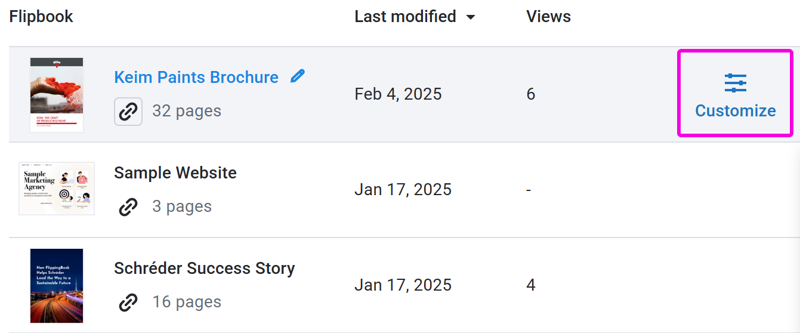
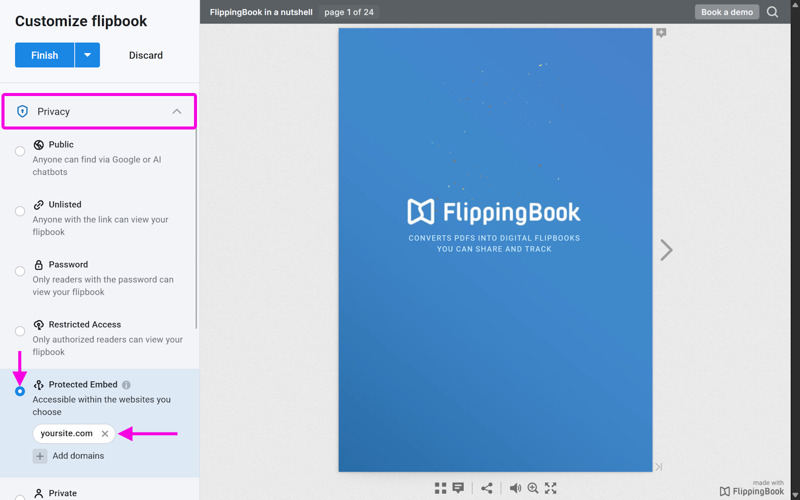
- On the Customize Flipbook screen scroll down to the Privacy section and click on it to unfold the options.
- Select the Protected Embed settings.
- Enter the domain name of the website you want to embed your flipbook into (e.g. test.com) and press enter. You can add more than one if needed.
- Disable the options to Share, Print, and Download as required (check here how). Sharing is pointless as the direct link will no longer work. Printing and downloading may compromise your protected content!
Your flipbook will now only work if embedded on a website that you added here. For more details and some of the finer points, please have a look at our article about Protected embed in detail. If you have dozens of flipbooks that you want to make embeddable on your site only, don't worry. It is possible to apply the restricted embed option to several flipbooks at once!
Attention⚠️Protected embeds only work with the FlippingBook embed code. If you try to embed the flipbook using an iframe, it won't work. The embedded flipbook will always show this warning: "Sorry, because of its privacy settings, this flipbook cannot be displayed here."
Related articles
Do you want to add additional protection settings? You can not only set up a password for your flipbook, but also restrict access via authorized email addresses.


