Closing the deal can feel like the finish line, but for your customers, it’s just the starting line. The moment a buyer becomes a client, their excitement turns into expectation. If their first experience with your product feels confusing, they may start second-guessing their decision. To keep new signups engaged past day one, you need to rethink how you welcome, guide, and support them from the moment they log in.
A well-designed customer onboarding process can help with that.
What Is Customer Onboarding?
Customer onboarding is the process of helping new clients get started with your product or service. It begins the moment they sign up and continues until they start seeing real value based on their specific needs and use case. Done well, onboarding gives clients a clear understanding of your product’s core capabilities and how it can support them over time.
Most companies assume onboarding begins with a standard welcome email and ends once a setup guide is delivered. In reality, the client onboarding journey starts the second a buyer decides to trust you with their money.
A strong customer onboarding process guides clients through each stage of product use, answers questions before they come up, and builds confidence that they made the right choice.
📝 Simply put, the goal of customer onboarding is to help clients see the product’s value quickly enough to keep using it long term.
Why Poor Client Onboarding Is Costing You Clients
If your customers struggle to understand your product or reach value quickly, they have very little reason to stick around. And the first few days matter a lot.
According to SaaSFactor data, 75% of users abandon products within the first week because of poor onboarding. In many cases, the problem isn’t the product itself. Customers simply don’t get far enough to see what it can do for them.
Here’s where things can go wrong:
- It takes too long to reach value. Users who experience core product value within 5–15 minutes are 3x more likely to stay than those who wait 30 minutes or more.
- Everyone gets the same experience. Personalized onboarding can increase activation by 30–50% compared with a generic approach.
💡 Use case example:
A marketing admin may need onboarding focused on setting up a workspace, inviting teammates, and configuring lead generation. A designer using the same platform may need a much shorter path focused on creating, customizing, and sharing client materials.
- Small points of friction add up. Each additional form field in an onboarding flow can reduce completion rates by 5–7%. An extra step may seem harmless, but too many of them can make getting started feel like work.
- The impact goes beyond activation. Companies with highly effective onboarding achieve 2.5x higher customer lifetime value. Helping customers get started well can influence the relationship long after onboarding is over.
📝 Customers need to reach their first meaningful result before they lose interest. SaaStr suggests getting customers fully onboarded within 30 days, and ideally much sooner. Klaviyo, for example, reportedly reaches 90% activation within 30 days across more than 100,000 SMB customers.
In short, a clear customer onboarding strategy can remove unnecessary friction, make guidance more relevant, and help customers reach value faster.
Customer Onboarding Process: Key Steps
So, how do you create an onboarding process that helps people get started without overwhelming them?
The exact journey will vary depending on your product, customer type, and level of support. Still, most effective onboarding follows the same basic logic: welcome the customer, understand what they need, help them get set up, guide them toward their first meaningful result, and support them from there.
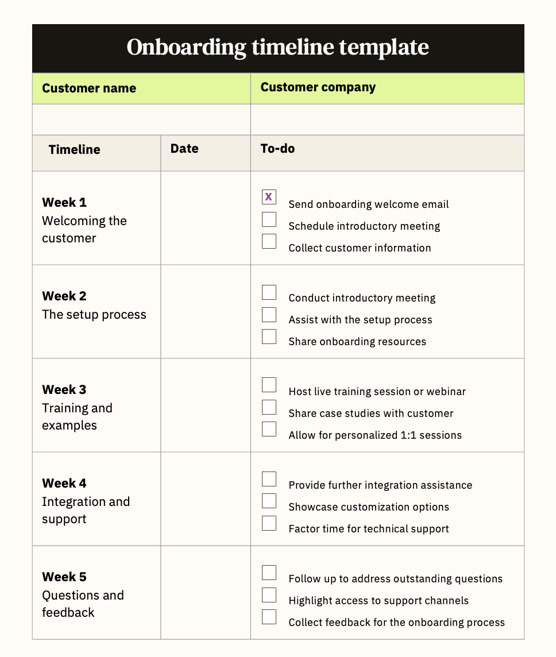
Onboarding timeline template. Source: zendesk.com
Here’s a simple overview of the main customer onboarding steps:
| Customer onboarding step | What happens | Why it matters |
| 1. Welcome and set expectations | Send a welcome message, explain what happens next, and point customers to the first resources they need. | Customers know where to start and what to expect, reducing confusion and the risk of dropping off before they really begin. |
| 2. Understand customer goals | Ask about their role, use case, priorities, and expected outcome through a short form, survey, or kickoff call. | You can focus onboarding on what is actually relevant instead of making customers work through information they may never need. |
| 3. Complete the initial setup | Help customers configure their account, invite team members, connect integrations, or complete technical setup. | Removing setup blockers early means customers can start using the product for real work sooner. |
| 4. Guide them to first value | Walk customers through an important workflow directly inside the product using prompts, checklists, or step-by-step guidance. | Customers make progress inside the product from the start, which helps them see its value sooner. |
| 5. Provide learning resources | Share guides, videos, FAQs, interactive materials, or a centralized onboarding space customers can return to. | Customers can find answers independently when they need them, without waiting for support or searching through scattered resources. |
| 6. Follow up and track progress | Check whether customers are moving forward, gather feedback, and identify where they get stuck. | You can catch friction before it turns into inactivity or churn and improve weak points in the onboarding process. |
| 7. Move into ongoing support | Introduce advanced features, additional resources, or next steps once customers are comfortable with the basics. | Onboarding grows into long-term product adoption, helping customers get more value over time and supporting retention. |
💡 Use case example:
An in-product onboarding flow can visually guide users through key setup steps. Our advice—keep onboarding close to the actual workflow. Guiding customers directly inside the platform helps them learn by doing, rather than reading instructions and trying to apply them later.
In-product onboarding checklist
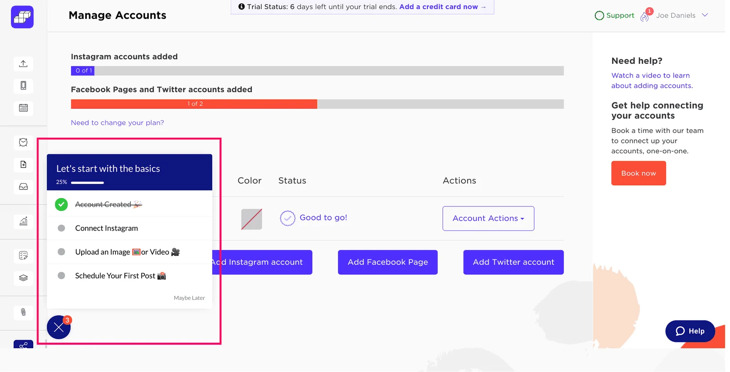
Sked Social’s four-step onboarding checklist. Source: userpilot.com
The important thing is not to force every customer through every step in exactly the same way. A self-service SaaS product may rely heavily on customer onboarding automation, while a complex B2B service may need kickoff calls, training sessions, and more personalized support.
How Interactive Content Improves Onboarding
Most onboarding content is built to inform. A PDF guide, a welcome deck, a knowledge base article—all useful, but all passive by nature. And there’s still the question of whether anything actually landed.
Interactive content works differently. Instead of asking customers to read and remember, it invites them to explore, click, and engage at their own pace.
📝 There's a real difference between reading about how something works and actually seeing it demonstrated in an embedded video, hearing a product expert walk you through it in an audio clip, or working through a visual step-by-step guide with pop-up images that show exactly what to do next.
According to research, companies that use interactive content see a 94% higher increase in content views compared to those relying on traditional, static content. Depending on your product and customer journey, interactive onboarding can take several effective formats:
1. Product demos
Demo tools like Supademo or Arcade let users step through self-guided, clickable product walkthroughs directly on your website or in welcome emails before they even set up their accounts.
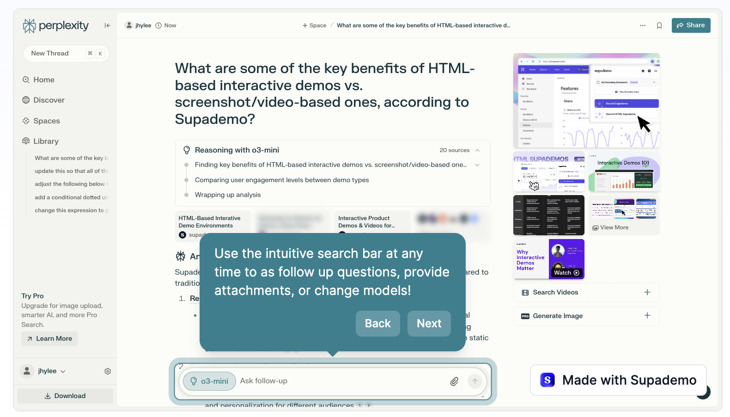
Interactive demo for Perplexity, powered by Supademo. Source: supademo.com
2. Interactive flipbooks
Online flipbooks transform static PDFs into digital guides enriched with embedded videos, clickable links, pop-up images, and lead forms. Customers open onboarding materials through a simple link on any device. With a format like this, you keep the familiar structure of a guide or onboarding brochure, but can enrich it with interactive elements that drive immediate engagement.
💡 Use case example:
Instead of sending a new client a PDF manual followed by several separate tutorial links, you can create one customer onboarding guide that walks them through setup, includes short demonstrations, and links directly to key product areas—a resource they can return to whenever they need it.
Replace PDFs with interactive onboarding flipbooks
3. In-app interactive checklists & guided tours
In-product onboarding tools (like Appcues or Userpilot) trigger dynamic checklists, progress bars, and targeted tooltips inside your app. Instead of reading instructions on a separate screen, users complete key actions directly within their active workspace.
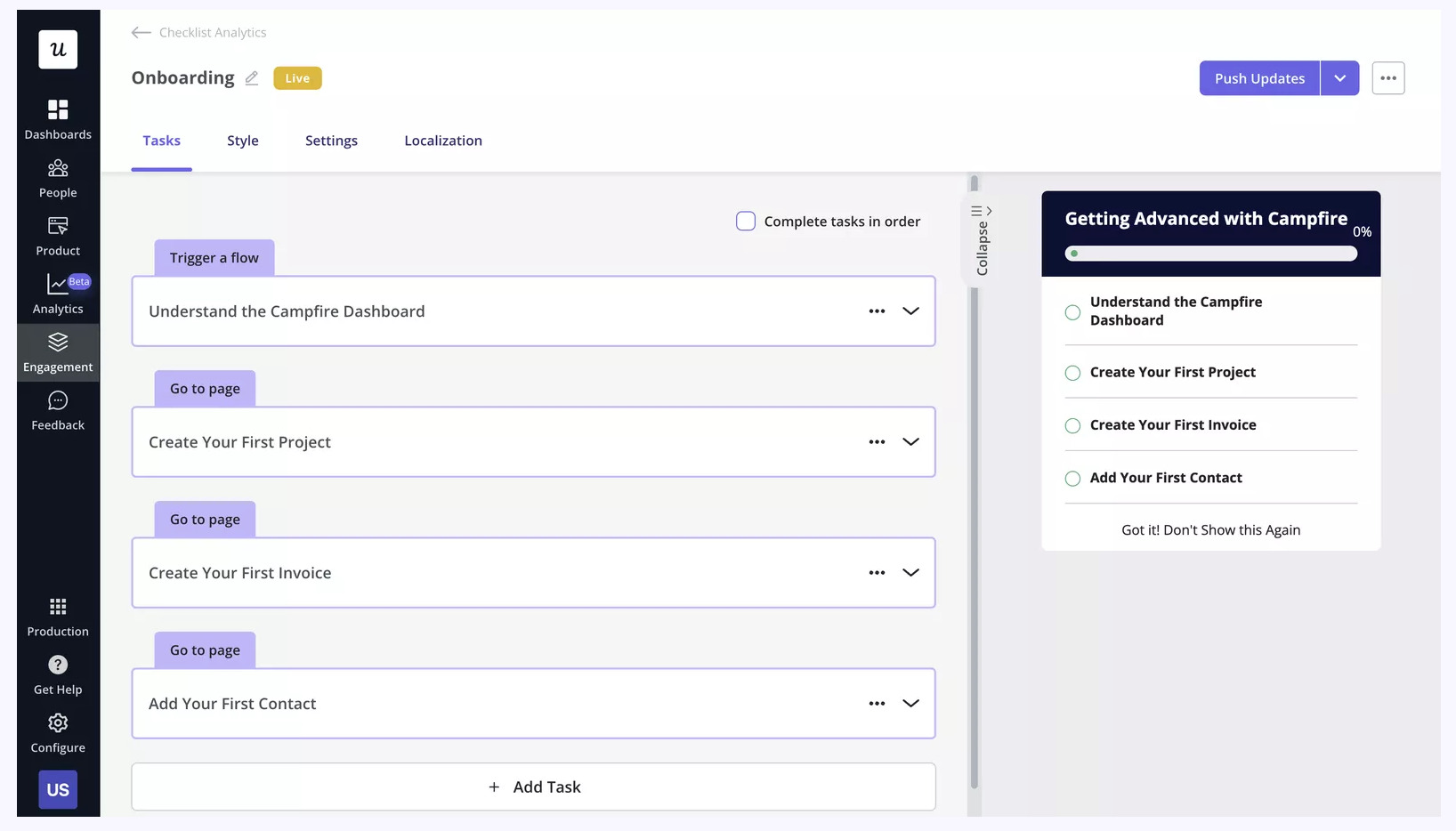
In-app onboarding checklist builder powered by Userpilot. Source: userpilot.com
4. Digital content hubs
It can be much more efficient to keep product information, tutorials, and useful links inside one structured hub—a digital bookshelf. So instead of digging through emails or separate links, customers know exactly where to go when a question comes up.
You can keep everything new customers might need in one online bookshelf—from FAQs and release notes to product roadmaps and essential company information. It gives your clients one reliable place to explore the product, catch up on updates, and find answers quickly.
Build your own digital onboarding hub
Overall, interactive content gives you a few practical advantages for onboarding:
- Explain complex steps visually. A short video or GIF can show customers exactly how a feature or workflow works instead of relying on a long block of text instructions.
- Let customers learn at their own pace. They can move through the material when they need it and return to specific sections later, without going through the entire onboarding flow again. You can implement a clickable table of contents to make navigation easier.
- See what customers actually use. Built-in analytics in SaaS products can show which pages your clients view, how long they spend reading, and which links they click. This gives your team useful context on where customers may need more guidance.
And when you combine all of this with a personalized approach, the impact goes even further, helping customers get started with confidence.
Customer Onboarding Best Practices to Follow
So, how can you improve your onboarding in practice? Start by looking at the experience from the buyer’s perspective. Here are 5 essential best practices to elevate your strategy, avoid common execution traps, and drive customer retention.
1. Lead with the "Aha!" moment, save admin for later
The fastest way to lose a new client’s interest is to make them work through long setup forms, account preferences, or team invitations before they see what your product can actually do. Whenever possible, move setup steps further into the journey so customers can experience value right away.
💡 Use case example:
Canva doesn't start by asking new users to set up brand colors or invite their whole department. Instead, it guides them straight into picking a design template. Once the user finishes their first graphic, Canva pops up a friendly prompt suggesting they invite team members to collaborate, so the admin request happens after the value is clear.
2. Let customers learn at their own pace
While guided tours and quick-start checklists build momentum, mandatory pop-up tutorials that block the screen make users feel trapped. Give clients control over their learning path by letting them skip, pause, or reopen onboarding resources whenever they need them.
💡 Use case example:
An experienced marketer signing up for a social media scheduling tool likely wants to dive right into connecting their accounts rather than going through a general product tour. A simple “Skip for now” option with a quick-start guide available gives users more freedom and keeps guidance within reach for anyone who needs it later.
3. Build a single, shareable resource hub
Kickoff calls and welcome emails often cause information overload, leading to clients forgetting where key files live or asking the same questions twice. Create one central source of truth where all key information, instructions, videos, and links live in one place.
💡 Use case example:
To save clients time, many teams replace help desk links with a single FAQ guide. Instead of searching through separate articles, clients can browse common questions, jump straight to the exact section they need, and access videos or setup links.
4. Send behavioral prompts instead of following a generic timeline
A scheduled 7-day email sequence doesn’t necessarily make sense if every customer is progressing at a different pace. Instead, use customer onboarding automation to send relevant messages based on what customers actually do in real time.
💡 Use case example:
If a client signs up for a newsletter tool and sends their first campaign on Day 1, don't send them an email on Day 2 explaining "How to build your first email." Instead, send a few tips they can use right away, like: "3 tips to boost your open rates." If they haven't sent anything after two days, send a helpful prompt featuring pre-built email templates. That will be much more useful.
5. Track time-to-value, not just progress bars
Seeing that a client clicked through 80% of your welcome slides doesn't mean they are getting results. Shift your marketing metrics toward measuring time-to-value—how quickly a client achieves their first meaningful business outcome with your service.
Final Thoughts
A great customer onboarding process is never really “finished.” As your product changes and you learn more about your customers, your onboarding should change with it.
If you want to improve it today, start with the first few days of the customer journey. Are you asking for too much setup before they see value? Is everyone getting the same flow? Can customers easily find help when they need it?
Then fix what slows them down. Remove unnecessary steps, make guidance more relevant, and focus on getting customers to their first useful result faster. That’s what makes onboarding work long term.