You’ve poured hours into creating the perfect PDF—a brochure, menu, catalog, or magazine and are looking for ways to share it with the world. PDF email attachments clog inboxes and are nearly impossible to track. Printed copies are costly, static, and outdated the moment something changes. So how do you share your content instantly, effortlessly, and without blowing your budget?
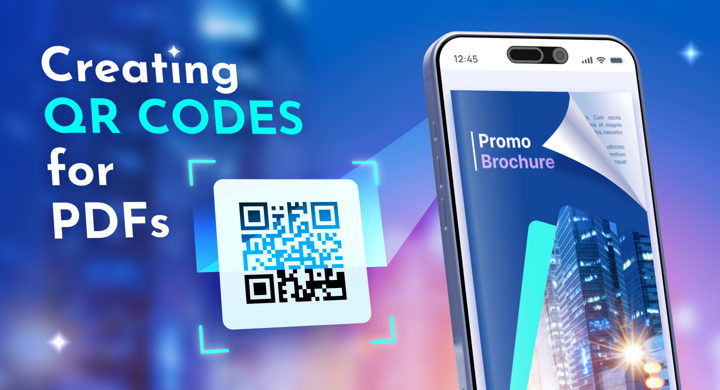
Enter QR codes. They bridge the physical and digital worlds, giving readers instant access to your PDF with a single scan—no typing long URLs, no searching through emails.
However, easy access is only half the story. A QR code can open your document—but it doesn’t guarantee a great reading experience or easy content updates.
This is where FlippingBook makes a difference. Unlike a standard QR code that links to a clumsy, slow-loading PDF file, FlippingBook turns your document into a mobile-friendly flipbook that comes with a built-in QR code generator. The flipbook loads instantly, looks great on any screen size, and engages readers immediately.
The best part? The QR code is dynamic. You can update the content of your flipbook as much as you need without ever having to reprint the QR code.
💡 Pro tip: Don’t just link to a file. Link to an experience. Check out this flipbook example and see for yourself!
FlippingBook for Your Digital Documents
How to Create a Trackable QR Code (In 3 Minutes)
1️⃣ Upload your PDF. Sign up for a free trial, and FlippingBook will automatically convert your file into a smooth, interactive flipbook.
2️⃣ Customize your flipbook. Add your branding, clickable links, videos, GIFs, or pop-up images to make the document come alive.
3️⃣ Generate your code. Click Share, select the QR code icon, and set the desired size. You can download it as a high-res PNG perfect for print.
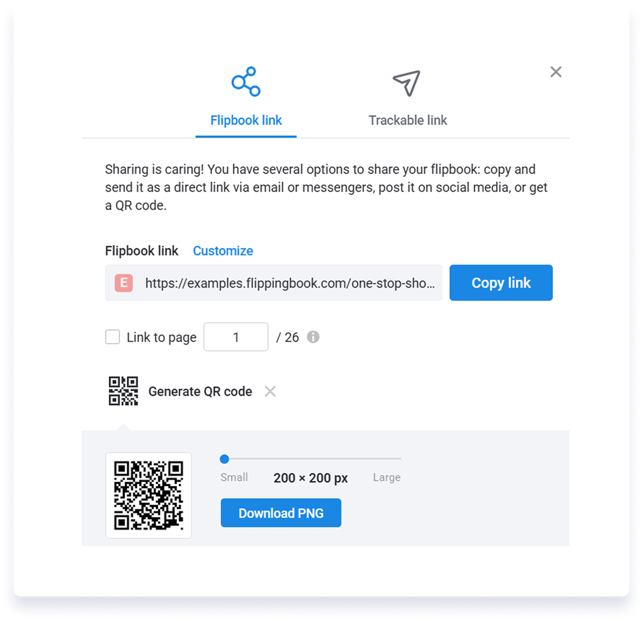
4️⃣ Share the QR code. Place the code on catalogs, menus, business cards, packaging, or flyers. Display it on your website or add it to your email signature. Possibilities are endless: share the QR code any way you prefer.
Scan this QR code to open a flipbook right away
Why "Just a PDF" Isn't Enough: Tracking Advantage
Standard PDF links leave you in the dark. You have no idea if anyone actually read your brochure.
FlippingBook changes the game by providing insights into your content performance. With FlippingBook’s built-in analytics, you can track:
- Engagement: How long did they read? Which pages kept their attention?
- Geography: Where are your scans coming from?
- Device data: Are your readers on iPhone, Android, or tablet?
💡 You can also create an individual trackable link to analyze how leads and prospects interact with your content and reach out to them with the right data at hand.
This isn't just data; it's ROI. You’ll finally know which flyer, brochure, or magazine is actually driving traffic.
7 Ways to Bridge the Print-Digital Divide
Where does a QR code work best? Anywhere your customer is offline, but you want them online.
📣 Marketing: Turn a single-page flyer into a gateway for a 50-page interactive guide.
🛎️ Hospitality: Replace outdated paper menus with pristine digital menus that you can update daily.
🛍️ Retail: Place codes on shelf-talkers to show "How-to" guides, catalogs, or lookbooks right at the point of purchase.
🏗️ Construction: Stick codes on equipment linking to safety manuals—keeping workers safe and compliant.
🏫 Education: Add codes to textbooks or handouts that launch flipbooks with bonus materials, instant video tutorials, or quizzes.
🚗 Automotive: Place a sticker in the door jamb linking to service history and digital owner's manuals.
👩🏽⚕️ Healthcare: Allow patients to scan brochures for private, take-home care instructions without wasting paper.
Ready to Turn Your PDF into a Scannable Experience?
Your print materials should work as hard as your digital content. With FlippingBook, you get a premium reading experience, the ability to update content on the fly, and the data to prove it works.
Turn your PDFs into interactive flipbooks today