


Uploading your publications to FlippingBook Cloud
 Product: FlippingBook Publisher
Note!Until early 2026, we offered the "Unlimited Cloud" upgrade for FlippingBook Publisher users. This upgrade allowed users to upload more than 3 flipbooks to our cloud. This upgrade is no longer available as FlippingBook Online is now the platform of choice for clients looking to use our cloud hosting. Clients who already use Unlimited Cloud can continue to do so. Clients who do not have Unlimited cloud can publish up to 3 flipbooks as long as they have an active Support & Updates contract.
FlippingBook Publisher lets you upload your publications to the web in just a few clicks. The easiest way to do this is by using our FlippingBook Cloud, an online service designed for storing digital flipbooks.
How to upload your publications to FlippingBook Cloud?
To upload a publication to FlippingBook Cloud, just do the following:
- Open your project file, or import your PDF to create a new one.
- Once your project is ready, click on the Upload Publication button on the top bar, and choose the FlippingBook Cloud option in the pop-up window:
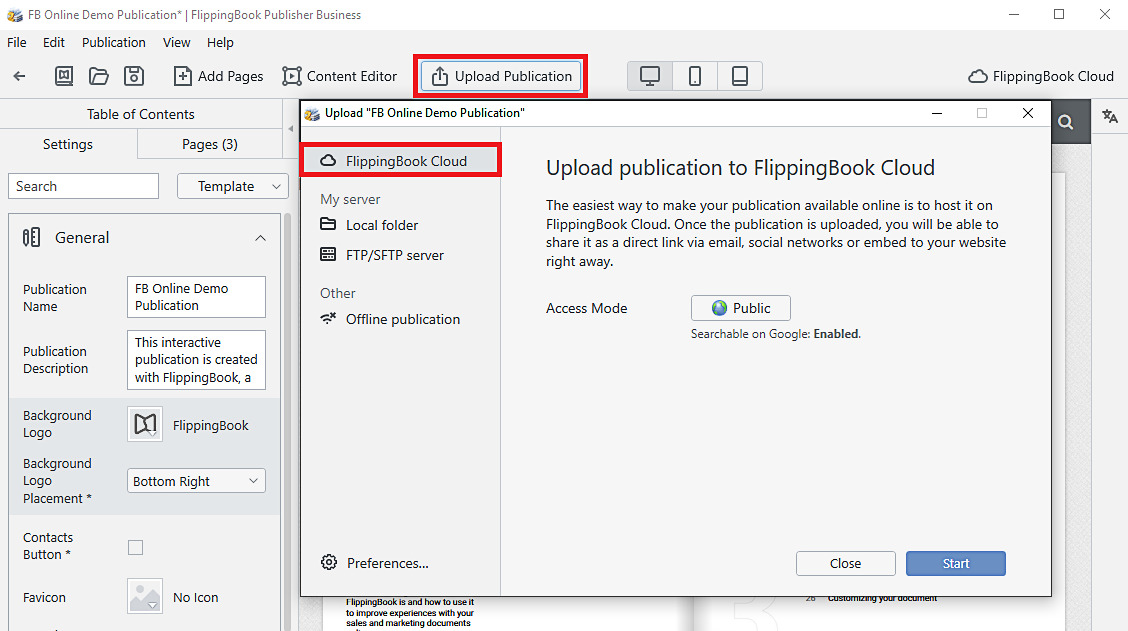 You change the Access Mode to enable/disable Google search indexing for publication. With the Business edition, it's possible to protect the publication with a password. It is also possible to specify domains where the publication can be embedded.
 - After that, click on the Start button to upload your flipbook to the FlippingBook Cloud.
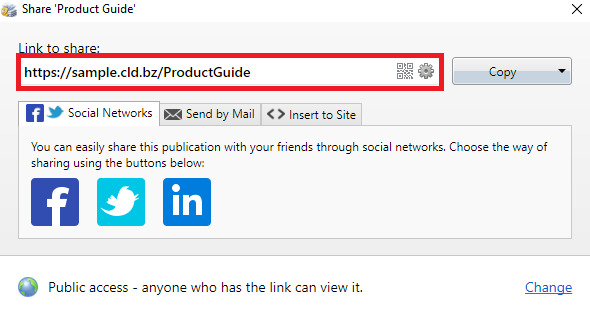
Immediately after the uploading process is completed, you will see a link that you can copy and share the publication link with colleagues, clients, or business partners.
See also
- Uploading publications to your servers
- Why use FlippingBook Online if you host with us?
- Working with FlippingBook Cloud


