


Importing documents: troubleshooting
 Product: FlippingBook Publisher
Our import settings work well in almost all cases, but with complex PDFs, there may be differences between your flipbook and the PDF. Whatever problem you are experiencing, we always recommend installing the latest version of FlippingBook Publisher. We constantly improve the quality of our conversion engine and have solved many such issues over the years.
Below you can find the issues that you can come across and possible solutions to them.
- The text in my publication is blurry.
- Poor quality of text in Internet Explorer when zoomed in.
- Some elements in my publication differ from the original PDF.
- FlippingBook Publisher is hanging during import.
The text in my publication is blurry
The text in your flipbook ought to be just as sharp as the text in your PDF (when looked at using a comparable zoom level of course!). If this is not the case, then there could be two reasons:
- text in your PDF is encoded in images, not as real text
- text is not converted properly by FlippingBook Publisher
The text in your PDF is encoded in images, not as real text
We handle images differently than text. The conversion settings for images are not optimal for text and will make the text look blurry. To check if your PDF uses images, open your PDF in Adobe Reader, and try to select the text. You should be able to perform actions like highlight, strikethrough, and copy/paste to a text editor. If you cannot do this, then your text is not real text but part of an image.
The best advice that we can give you is to ask the designer of the PDF to create a copy with real text. If this is not possible, then you could try the solution in the second point below. It will probably improve the quality a bit, but since your text is not real text, your users cannot find it when using the search function, and it cannot be indexed by search engines like Google.
The text is not converted properly by FlippingBook Publisher
It rarely happens that your PDF contains real text, but FlippingBook Publisher does not recognize it as such. Please try these three options to fix that:
- Make sure you have the latest version of Publisher. Try to convert the PDF there
- Reconvert blurry pages with other settings in Publisher
- Distill an original PDF in Adobe Acrobat Pro DC or in PDF 24
Make sure you have the latest version of Publisher. Try to convert the PDF there
If you have access to the latest version of the program, download and install it from your account page. Convert the PDF there. If you do not have access to the latest version, contact the support team. They will check if the PDF converts well in the latest version. If it converts fine there, ask the support team to help you update Publisher. Or use the other solutions below...
Reconvert blurry pages with other settings in Publisher
To reconvert pages:
-
go to the Pages tab
- select the page with blurry text. To select several pages keep the Ctrl-key pressed down to select them. To select all pages press Ctrl+A
- Right-click on the selected pages. Select Advanced Tools > Reconvert Pages.
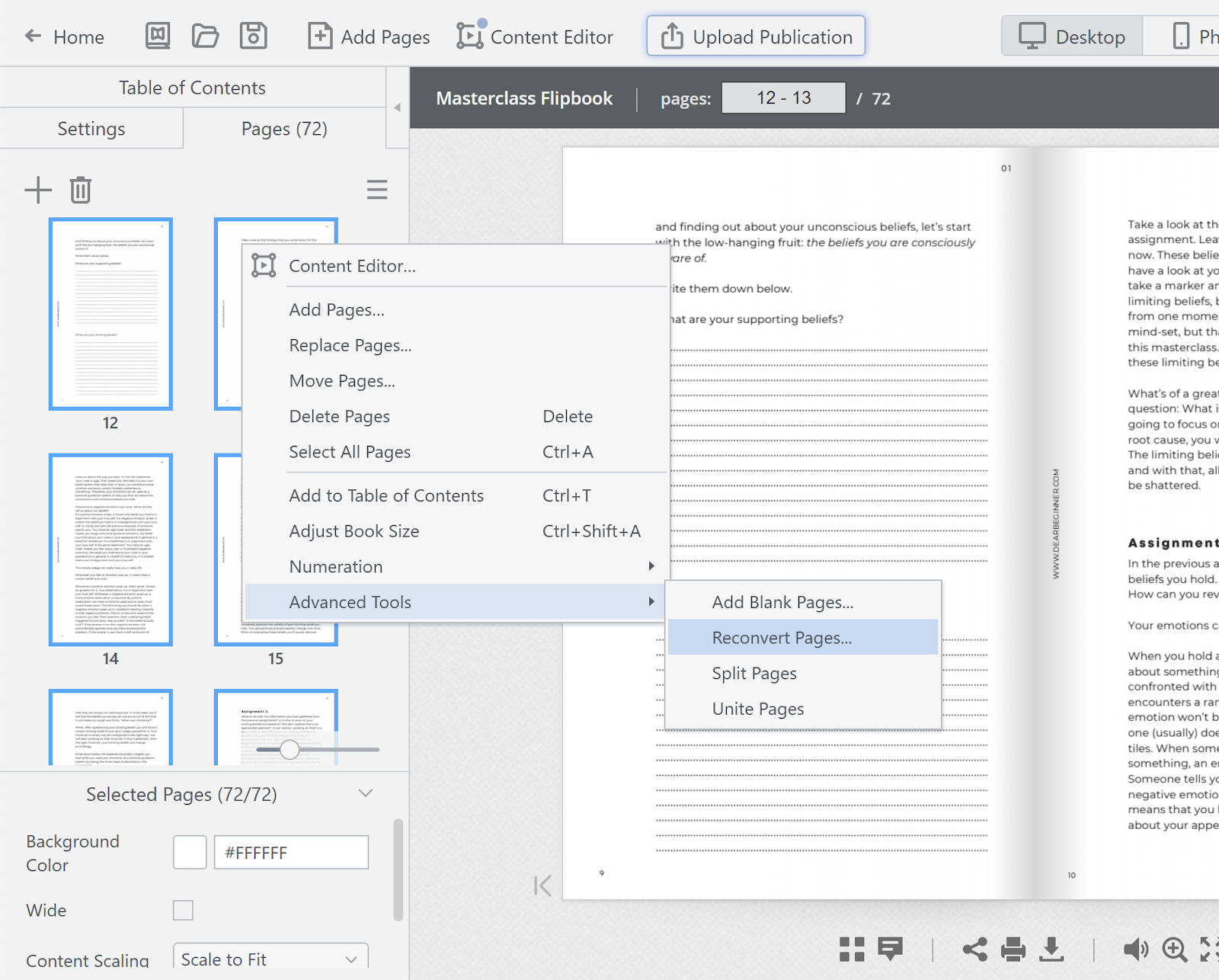
- click on the small cogwheel button
 in the popup window
 - change the Substrates format to PNG. Disable the Extract text layer by unchecking the boxes
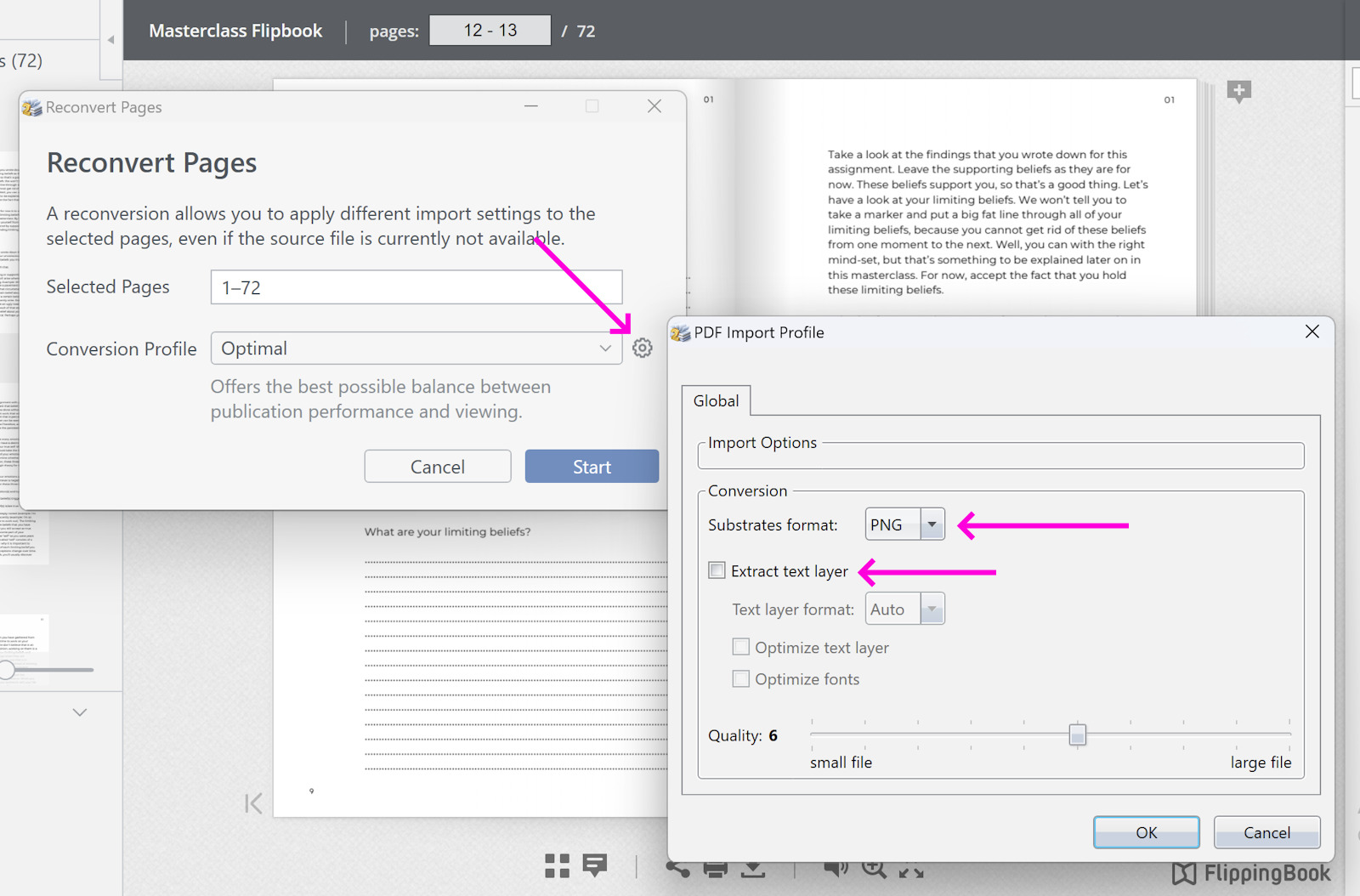
- click OK and Start
Distill an original PDF in Adobe Acrobat Pro DC or in PDF 24
Distill a troublesome PDF to make it less complex. Follow the steps in this article.
Poor quality of text in Internet Explorer when zoomed in
Some types of PDFs don’t look great when you open the flipbook version in Internet Explorer and then zoom in. 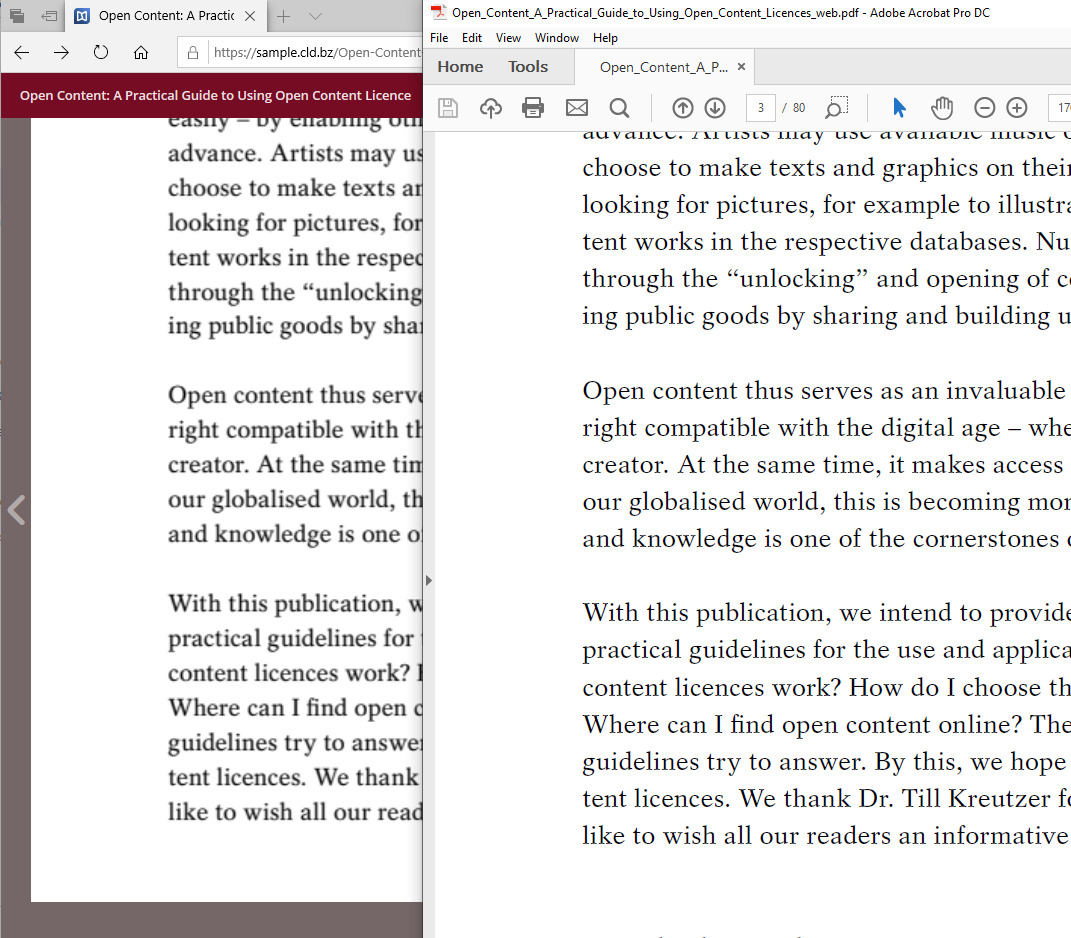
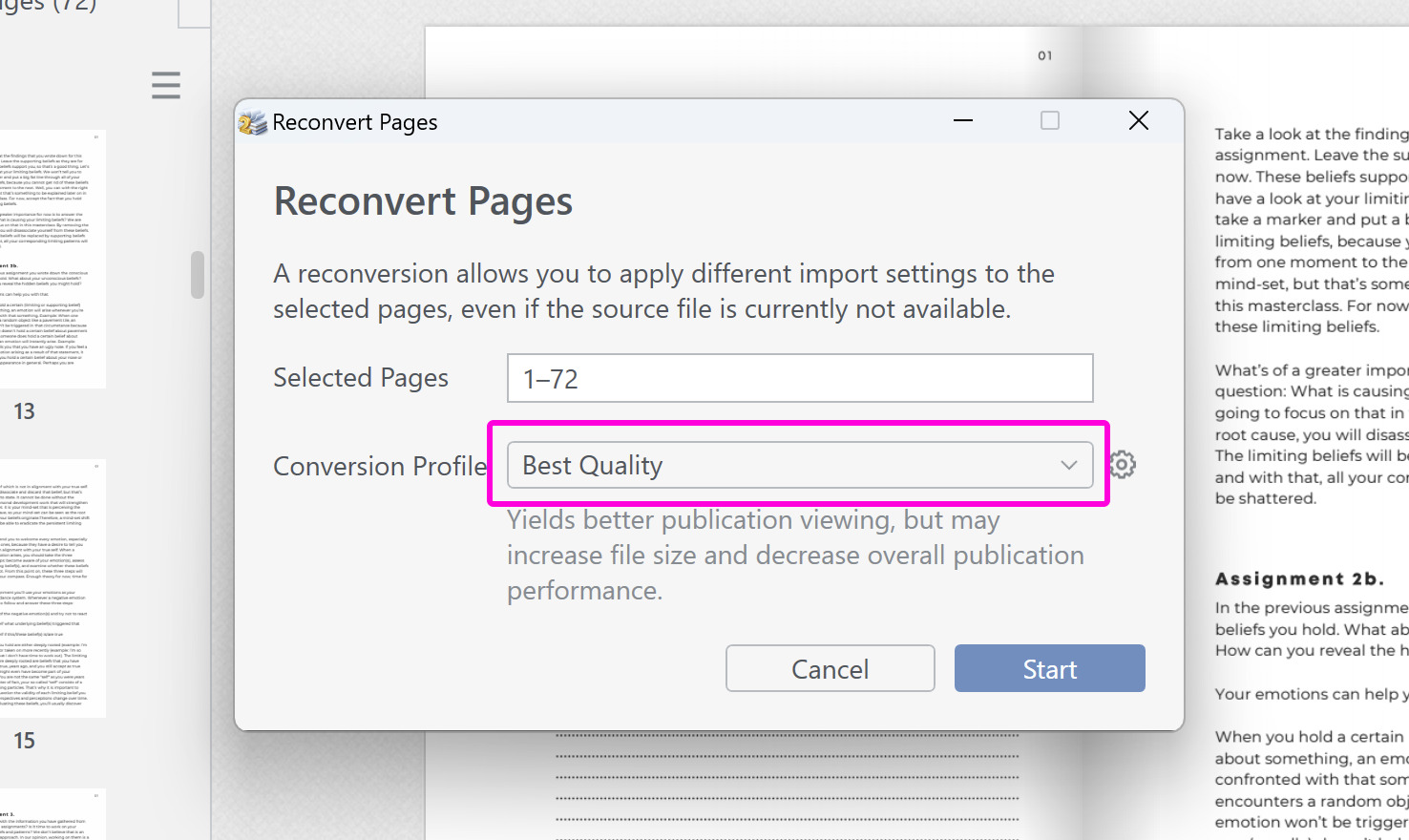
This is often easily repaired by using the Best Quality conversion profile. To reconvert an existing document with this profile:
- Go to the Pages tab.
- Select any page. Now press Ctrl+A. This should select all pages, outlining them with a blue border.
- Right-click, then select Advanced Tools > Reconvert Pages.
- In the drop-down menu under Conversion Profile choose Best Quality.
- Press Start.
If you need to apply this fix, then most likely it will affect most of your PDFs. In this case, we advise you to use this import profile as your default profile for future documents:
- In the menu bar, go to Edit > Preferences.
- Go to the Import tab.
- Change the Default PDF Profile to Best Quality.
- Press OK.
Some elements in my publication differ from the original PDF
It may happen that the text, colors, or other elements differ from those in your original PDF. Distilling the PDF in Adobe Acrobat Pro DC or in PDF24 often solves this problem. Please follow the instructions in this article.
FlippingBook Publisher is hanging during import
Sometimes a PDF, even a small one, can take very long to convert. Our first advice in situations like these is to just let it run. In most cases, it will eventually finish and you can enjoy your flipbook. Should it really not finish, then please send us the PDF so we can have a look.
The most common reason for this is that the PDF contains pictures that consist of thousands of objects. Typically these are engineering schemes, floorplans, or similar design pictures, that can be created in AutoCAD, Illustrator, Visio, or similar tools. This level of detail is probably very important when you actually build those conveyor belts, houses, or whatever the diagrams represent, but for creating a FlippingBook they are massive overkill. Below you can see a tiny part of the picture in the PDF on the left, and 12x zoomed in Adobe Acrobat. Look at the massive amount of objects here!
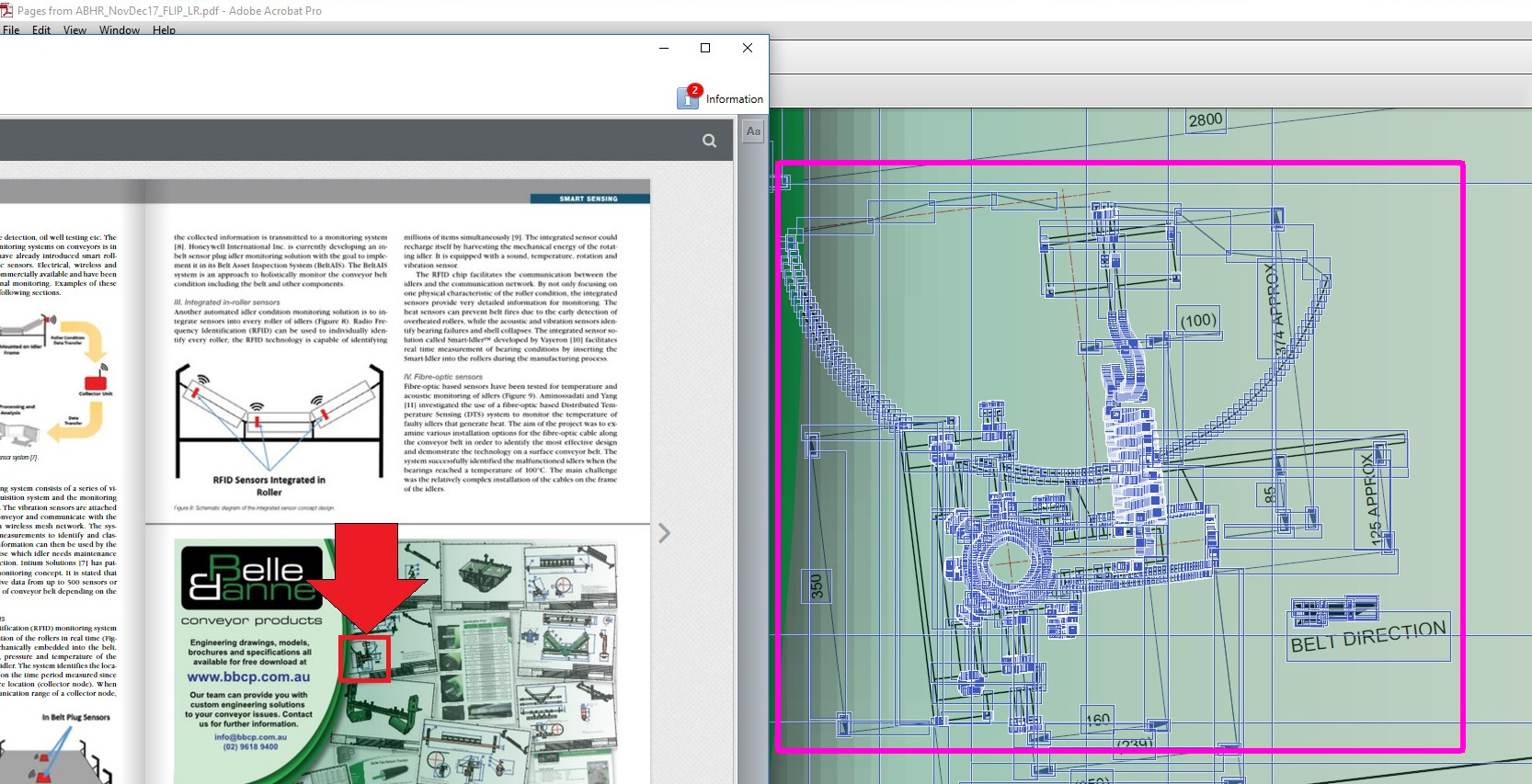
All the blue boxes are individual objects - and this is just the tiny part of the image. All these objects - and as you can see there are tens of thousands of them - have to be processed by our conversion software.
If you want to avoid such long conversions in the future, we’d suggest asking the designer of the PDF to not use a native export from AutoCAD (or whatever software they use) but just create a high-quality PNG image. That contains all the detail that you ever need (you can't zoom in to this level anyway in FlippingBook) and is converted in seconds.


